







An AI-Powered Learning Companion for Primary School Students
An AI-Powered Learning Companion for Primary School Students
My role
Ui designer
Type
Concept Project
Duration
May - June 2026


01 — OVERVIEW
Luma is an AI-powered educational platform designed to help primary school students stay organized, build effective study habits, and access learning support in one place.
The platform combines planning tools, AI assistance, voice-note processing, learning resources, progress tracking, and tutor support into a single experience designed for both students and parents.
As educational tools continue to fragment across calendars, messaging apps, note-taking platforms, tutoring websites, and AI chatbots, students often struggle to maintain a structured learning routine. Luma addresses this challenge by bringing these experiences together into a unified ecosystem.
01 — OVERVIEW
Luma is an AI-powered educational platform designed to help primary school students stay organized, build effective study habits, and access learning support in one place.
The platform combines planning tools, AI assistance, voice-note processing, learning resources, progress tracking, and tutor support into a single experience designed for both students and parents.
As educational tools continue to fragment across calendars, messaging apps, note-taking platforms, tutoring websites, and AI chatbots, students often struggle to maintain a structured learning routine. Luma addresses this challenge by bringing these experiences together into a unified ecosystem.
02- RESEARCH & INSIGHTS
Through competitor analysis and educational platform reviews, several recurring patterns emerged:
01
Students need structure
Many students know what they need to study but struggle with planning and consistency.
02
Parents need visibility
Parents want to support learning without constantly monitoring their children.
03
Learning materials are underutilized
Class recordings, notes, PDFs, and lesson content often remain unused after the lesson ends.
03
AI lacks educational context
General-purpose AI assistants answer questions but don’t understand a student's schedule, goals, or learning history.
03- PROBLEM STATEMENT
Primary school students often rely on multiple disconnected tools to manage their learning:
School assignments are tracked manually.
Notes are scattered across notebooks and recordings.
Parents have limited visibility into progress.
Tutors operate on separate platforms.
AI tools provide answers but rarely support long-term learning habits.
The result is a fragmented experience that makes it difficult for students to stay organized and motivated.
The challenge was to design a learning platform that not only helps students complete tasks but also encourages consistent learning behavior over time.
04- HOW MIGHT WE?
To turn the key challenges into design opportunities, we reframed them as four questions:
01- How might we help students organise their learning in one place?
02- How might we turn everyday learning materials into useful study tools?
03- How might we make AI support more relevant to each student's learning journey?
04- How might we give parents visibility without taking away student independence?
04- SOLUTION
Luma was designed as a connected learning ecosystem where every interaction contributes to a student's educational journey. Rather than treating planning, studying, tutoring, and AI assistance as separate experiences, the platform connects them into a single workflow.
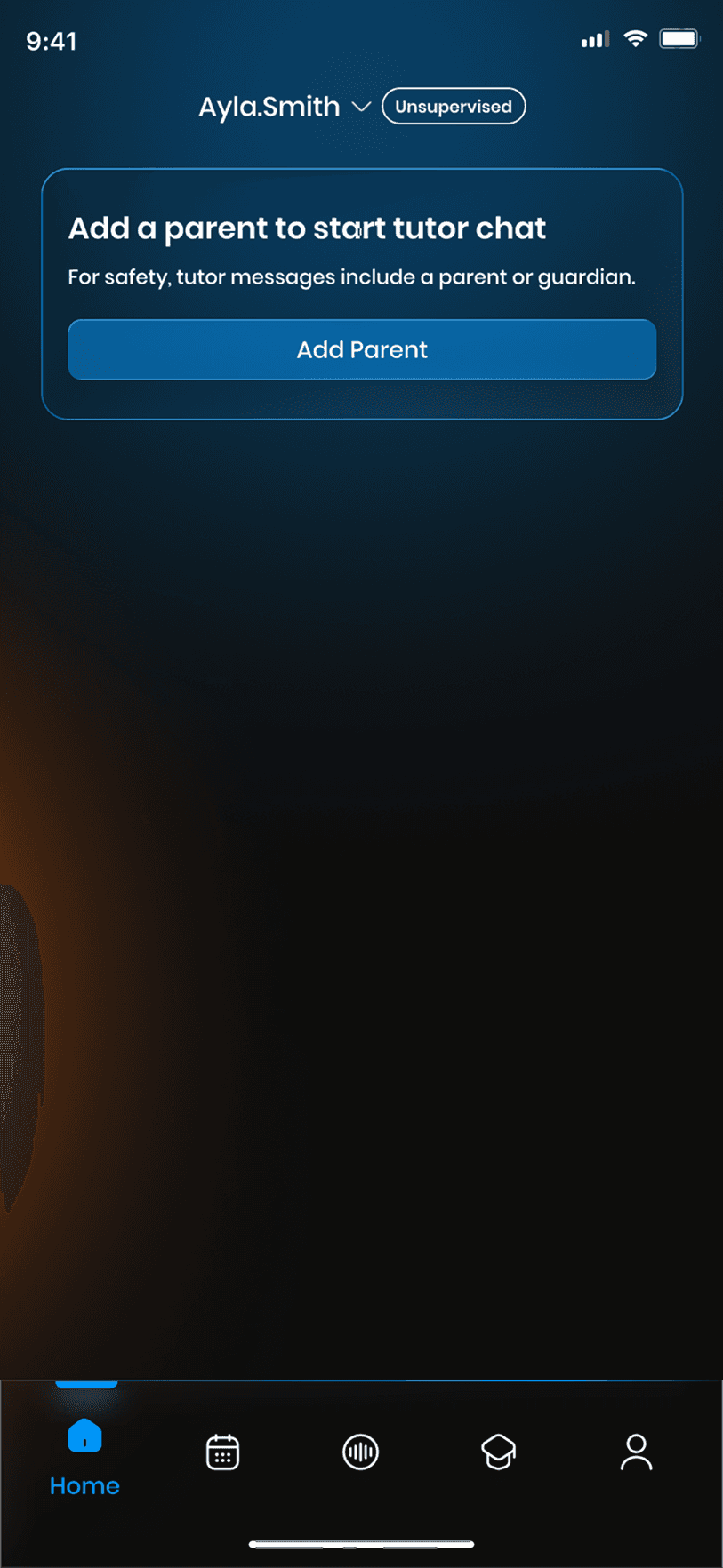
01. Onboarding, Personalisation & Parent Setup
01. Onboarding, Personalisation & Parent Setup
Luma begins with a guided setup where students add their school year, subjects, routine, learning preferences, and parent support. This helps the app personalise study plans, reminders, and recommendations from the start.


02. AI Learning Companion
02. AI Learning Companion
Ask Luma works like a study-focused AI assistant.
Students can ask questions, get explanations, summarise lessons, generate quizzes, create flashcards, and find learning materials based on their current study plan.


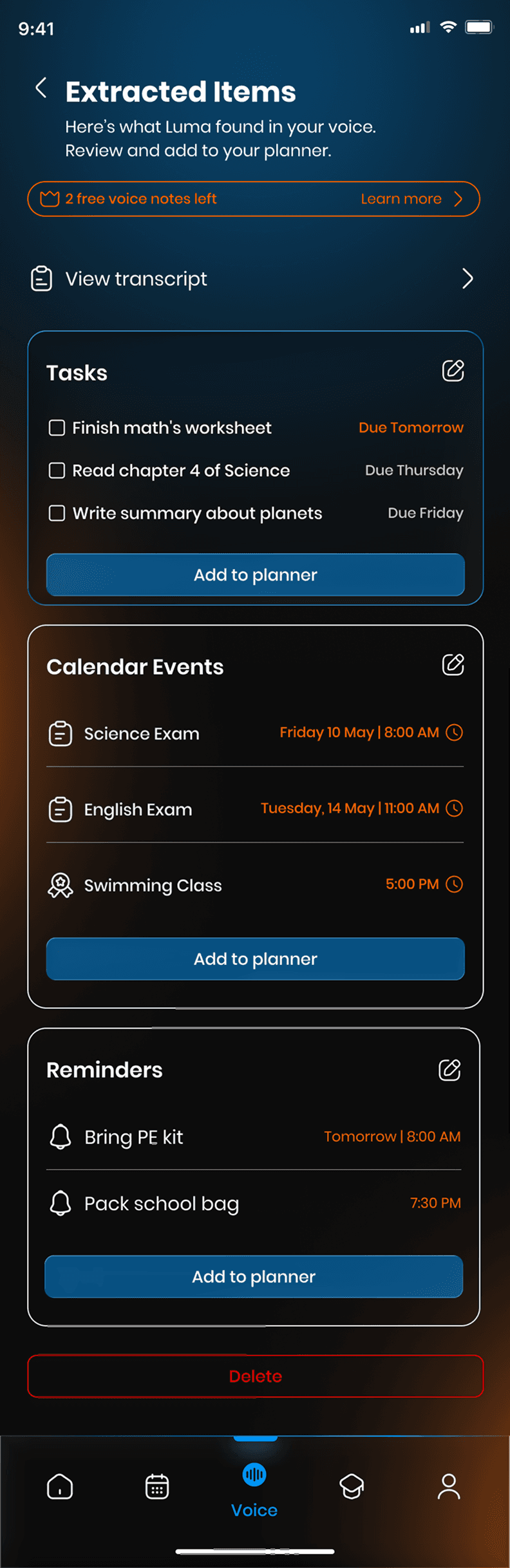
03. Voice Recording & Lesson Intelligence
03. Voice Recording & Lesson Intelligence
Students can record lessons or upload voice notes.
Luma turns recordings into transcripts, tasks, reminders, events, and study materials, making classroom content easier to review and reuse.




04. Smart Planner
04. Smart Planner
The planner brings together tasks, schedules, reminders, tutor sessions, and goals.
It helps students understand what they need to do today and what is coming next.


05. Student Dashboard & Progress
05. Student Dashboard & Progress
The student dashboard brings learning activity into one place.
Students can view subjects, tools, tutors, goals, and progress at a glance, helping them stay motivated and organised.


06. Quiz & Flashcards
06. Quiz & Flashcards
Luma turns lessons, recordings, PDFs, and tutor sessions into quizzes and flashcards.
Students can test their understanding, review key concepts, and turn mistakes into flashcards for focused revision.


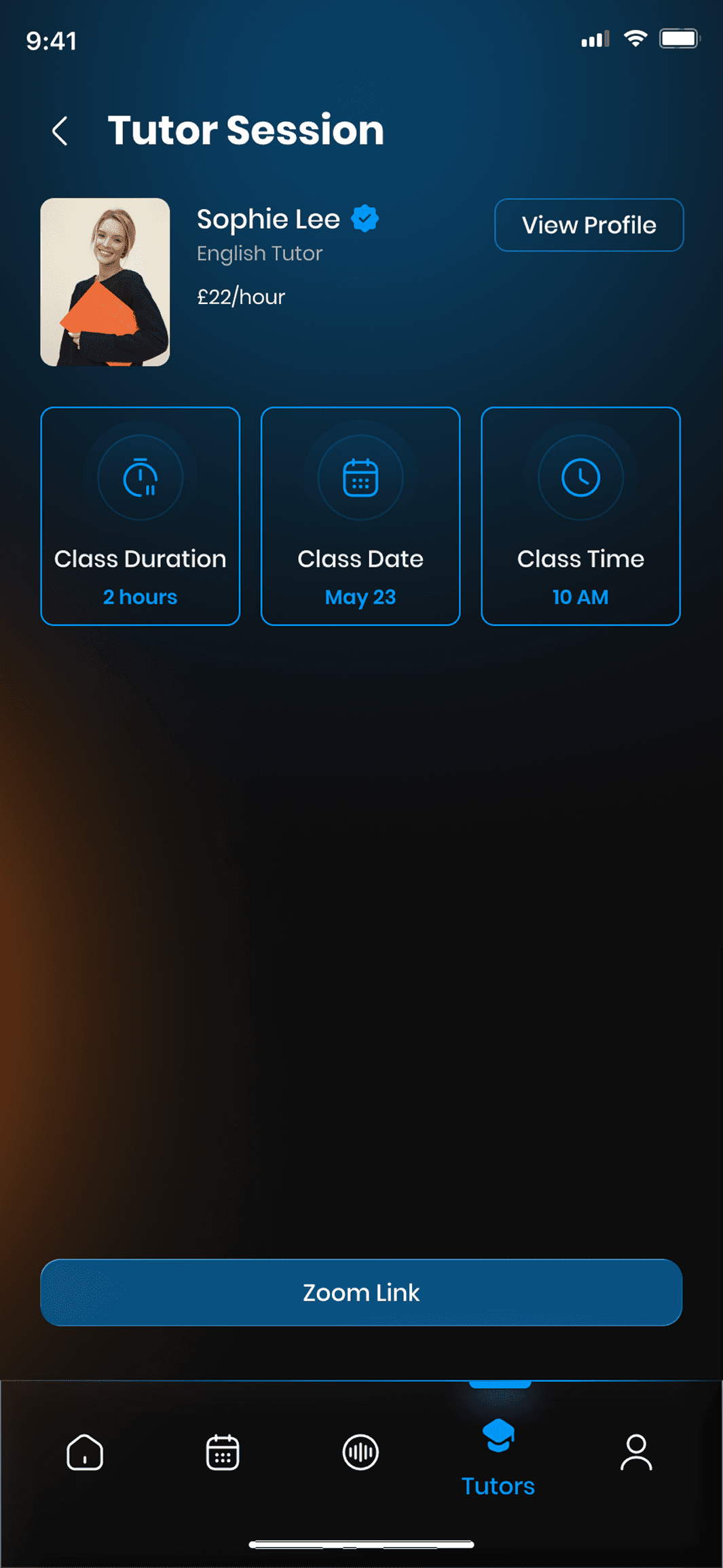
07. Tutor Marketplace
07. Tutor Marketplace
Students can browse verified tutors, view profiles, read reviews, and book sessions.
Bookings, payments, reminders, and tutor communication stay inside Luma for a safer experience.


02- RESEARCH & INSIGHTS
Through competitor analysis and educational platform reviews, several recurring patterns emerged:
01
Students need structure
Many students know what they need to study but struggle with planning and consistency.
02
Parents need visibility
Parents want to support learning without constantly monitoring their children.
03
Learning materials are underutilized
Class recordings, notes, PDFs, and lesson content often remain unused after the lesson ends.
03
AI lacks educational context
General-purpose AI assistants answer questions but don’t understand a student's schedule, goals, or learning history.
03- PROBLEM STATEMENT
Primary school students often rely on multiple disconnected tools to manage their learning:
School assignments are tracked manually.
Notes are scattered across notebooks and recordings.
Parents have limited visibility into progress.
Tutors operate on separate platforms.
AI tools provide answers but rarely support long-term learning habits.
The result is a fragmented experience that makes it difficult for students to stay organized and motivated.
The challenge was to design a learning platform that not only helps students complete tasks but also encourages consistent learning behavior over time.
04- HOW MIGHT WE?
To turn the key challenges into design opportunities, we reframed them as four questions:
01- How might we help students organise their learning in one place?
02- How might we turn everyday learning materials into useful study tools?
03- How might we make AI support more relevant to each student's learning journey?
04- How might we give parents visibility without taking away student independence?
04- SOLUTION
Luma was designed as a connected learning ecosystem where every interaction contributes to a student's educational journey. Rather than treating planning, studying, tutoring, and AI assistance as separate experiences, the platform connects them into a single workflow.
01. Onboarding, Personalisation & Parent Setup
Luma begins with a guided setup where students add their school year, subjects, routine, learning preferences, and parent support. This helps the app personalise study plans, reminders, and recommendations from the start.
02. AI Learning Companion
Ask Luma works like a study-focused AI assistant.
Students can ask questions, get explanations, summarise lessons, generate quizzes, create flashcards, and find learning materials based on their current study plan.
03. Voice Recording & Lesson Intelligence
Students can record lessons or upload voice notes.
Luma turns recordings into transcripts, tasks, reminders, events, and study materials, making classroom content easier to review and reuse.
04. Smart Planner
The planner brings together tasks, schedules, reminders, tutor sessions, and goals.
It helps students understand what they need to do today and what is coming next.
05. Student Dashboard & Progress
The student dashboard brings learning activity into one place.
Students can view subjects, tools, tutors, goals, and progress at a glance, helping them stay motivated and organised.
06. Quiz & Flashcards
Luma turns lessons, recordings, PDFs, and tutor sessions into quizzes and flashcards.
Students can test their understanding, review key concepts, and turn mistakes into flashcards for focused revision.
07. Tutor Marketplace
Students can browse verified tutors, view profiles, read reviews, and book sessions.
Bookings, payments, reminders, and tutor communication stay inside Luma for a safer experience.